
iWine2.6 - App Store
You'll be able to see results in few seconds.
Publisher Description
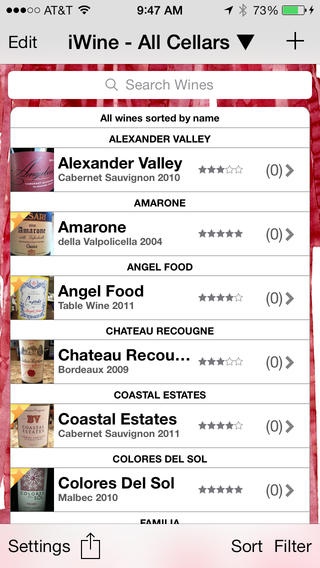
iWine is the perfect wine journal application for all wine lovers from the wine connoisseur to the casual wine drinker. iWine provides an easy way to track all of the wines that you own, taste, purchase, and recommend. iWine has an intuitive, easy to use, native iPhone User Interface that highlights usability. iWine contains fields for all of the important attributes of a fine wine including the Winery, Vintage, Varietal, Varietal Type, Country, State, Region, and the application includes fields for # Bottles Owned, Price, Rating, Tasting Notes, URL, Maturity Date, Restaurant / Store, Bottle Size, Importer, Alcohol Content, wine Pairing, Purchase Date, and Bottling Date.
iWine gives you all of the tools you need to manage your own cellar and to never forget that great wine you taste while out to dinner with friends and family. iWine gives you the ability to store an image of the wine bottle label, either via the camera or photo library, so that you can easily refer to it when purchasing your favorite wines.
New Features for Version 2.6.
Graphical updates
Dropbox API updates
Region bug fix
Key Feature List
Store wine data based on winery, varietal, vintage, varietal type, region (country, state, and region), rating, pairing, price, bottles owned, URL, maturity date, restaurant / store, Importer, alcohol content, purchase date, bottling date, and notes.
Stores thumbnail and full size images of wine bottle labels.
Online backup and restore of iWine information via Dropbox.
Manage all of your wine cellars via iWine s multiple cellar implementation.
Add wines to your Wish List.
Mark wines as favorites.
Two rating systems are supported: 5 star, or 100 point.
Easily sort your iWine by any field.
Search feature that includes all text fields for all wines to easily find the wine you are looking for.
Filter your iWine by Favorites only, Wish List wines, Wines I Own, Unrated Wines, Maturity or combinations of these filters.
Support for multi-level Regions field formatted as Country > State > Region with pre-populated database of wine regions which is fully user-customizable.
Provides an included library of wine varietals, varietal types, and regions and gives the user the ability to customize these lists by adding or removing items.
Includes Settings to customize application look and feel.
Bottles Owned count is summarized on Main View and can be optionally added to the Home Screen as an App Badge.
Stores the number of bottles owned for each wine (in each cellar) and it is conveniently displayed on the main view.
Share and import wines via e-mail.
International currency support.
Export your data easily as a .csv file compatible with Microsoft Excel or any other spreadsheet application.
Save wine bottle images back to iOS photo library.
A sample of planned future upgrades will include the following features.
Universal iPhone/iPad app.
Wireless sync of wines between iPhone/iPad/iPod Touch using iCloud.
Requires iOS 7.0 or later. Compatible with iPhone, iPad, and iPod touch.
About iWine
The company that develops iWine is Ageasoft, LLC. The latest version released by its developer is 2.6.
To install iWine on your iOS device, just click the green Continue To App button above to start the installation process. The app is listed on our website since 2009-04-10 and was downloaded 0 times. We have already checked if the download link is safe, however for your own protection we recommend that you scan the downloaded app with your antivirus. Your antivirus may detect the iWine as malware if the download link is broken.
How to install iWine on your iOS device:
- Click on the Continue To App button on our website. This will redirect you to the App Store.
- Once the iWine is shown in the iTunes listing of your iOS device, you can start its download and installation. Tap on the GET button to the right of the app to start downloading it.
- If you are not logged-in the iOS appstore app, you'll be prompted for your your Apple ID and/or password.
- After iWine is downloaded, you'll see an INSTALL button to the right. Tap on it to start the actual installation of the iOS app.
- Once installation is finished you can tap on the OPEN button to start it. Its icon will also be added to your device home screen.
Program Details
System requirements
Download information
Pricing
Version History
version 2.6
posted on 2009-04-10
Disclaimer
Official App Store Link
We do not host iWine on our servers. We did not scan it for viruses, adware, spyware or other type of malware. This app is hosted by Apple and passed their terms and conditions to be listed there. We recommend caution when installing it.
The App Store link for iWine is provided to you by apps112.com without any warranties, representations or guarantees of any kind, so access it at your own risk.
If you have questions regarding this particular app contact the publisher directly. For questions about the functionalities of apps112.com contact us.
